Meanwhile / November 2026 / Part II: Inside the Instrument
The toaster never made it onto the stage. Its software descendants did.
The real problem was never how to get AI to generate music. It was how to turn a probabilistic sound engine into an instrument a musician can trust.
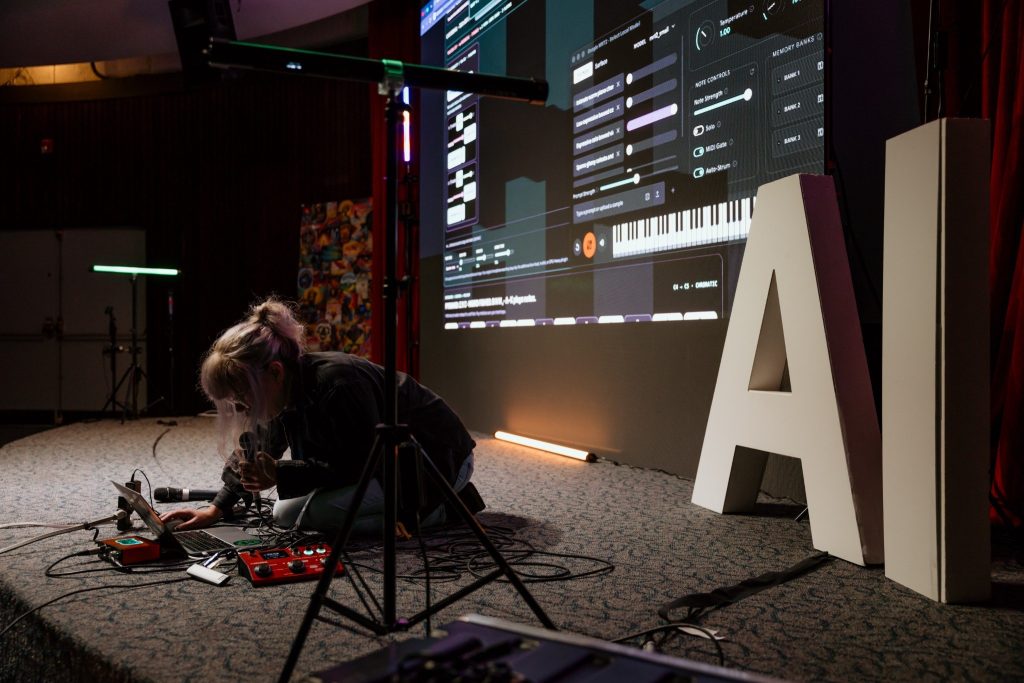
On October 29, I performed my first solo electronic set at Futureproof Festival in Vancouver: an AI-integrated interpretation of Radiohead’s Pyramid Song, built around live vocals, looping, and a small army of code running on an 8GB MacBook.
Futureproof Festival, October 29, 2026. The instrument is software, but the performance is very physical.
This is the engineering companion to Part I: The Toaster Was a Decoy. The code is open source at github.com/suzyeaston/suzy-ai.
It involves Swift, Python, JavaScript, a genuinely generative music model, several arguments with the concept of time, and a magnificent number of green test results that did not produce any sound.
01 / A music model is not an instrument
In September, The Appliance Latent Space was supposed to be a physical toaster instrument. Knobs, sensors, a lever, a ridiculous domestic appliance given a second career as a performance controller. I was exploring DCTRL and thinking about tangible interfaces: what happens when AI becomes something you play instead of something you ask?
The useful discovery was that the hardware didn’t have to house the intelligence. A physical controller could send events to the computer. Eventually, even the toaster could be optional.
My earlier SUZY//AI experiments included a locally running Qwen language model, Python tools, musical analysis, and note-generation prototypes. But a language model that returns a plausible chord progression is not the same thing as a real-time musician. A text model can reason about harmony and propose events. But a useful live musical instrument needs controlled audio generation with meaningful interactions between notes, timbre, and time.
The pivot was Google’s Magenta RealTime 2 Small: a 230-million-parameter, music-native streaming model with an Apple Silicon Audio Unit. It generates audio, accepts MIDI steering, and blends text-conditioned musical styles. Google’s published architecture uses frame-level autoregression, roughly 40ms audio frames, frame-aligned MIDI conditioning, and MusicCoCa-embedded style prompts. Its published roughly 200ms control latency is not a benchmark of my complete microphone-to-headphones system. The Small model was the realistic option on an 8GB Apple Silicon laptop.
Crucially, I wasn’t training a model on my voice, cloning an artist, or feeding a live microphone into a magical musical consciousness. I was building the instrument around the model: its controls, prompts, harmonic vocabulary, recording paths, and limits.
02 / Control plane, audio plane, human
The key decision was to keep command and interface logic away from the real-time audio render path. That let me redesign the instrument without asking JavaScript or a language model to meet an AU callback deadline.
MY HANDS / COMPUTER KEYS / MIDI CHORDS
                 ↓
     Browser performance interface
      (Web Audio, loops, pedals)
                 ↓ JSON over localhost
    Python stage server / command bridge
                 ↓ JSON over stdio
   Swift macOS AVAudioEngine host
                 ↓
   Google's Magenta RealTime 2 AUv3
                 ↓
  Native audio → reverb → PCM capture
                 ↓
  Mac output / native looping engine

MY VOICE → BOSS VE-22 → SCARLETT SOLO
                 ↓
 Browser microphone monitoring + AudioWorklet vocal loops
The browser interface is the instrument panel. The Python stage server runs on 127.0.0.1 and accepts bounded, token-checked commands. The Swift host owns the actual native Audio Unit and audio graph. The Python native bridge speaks to that host as one subprocess, rather than spawning a new model every time I touch a chord.
The web UI isn’t secretly synthesizing Magenta. And Magenta isn’t quietly listening to all of Chrome. They are separate audio worlds, connected by control messages and explicit capture routes. That distinction would later consume a slightly unholy amount of debugging.
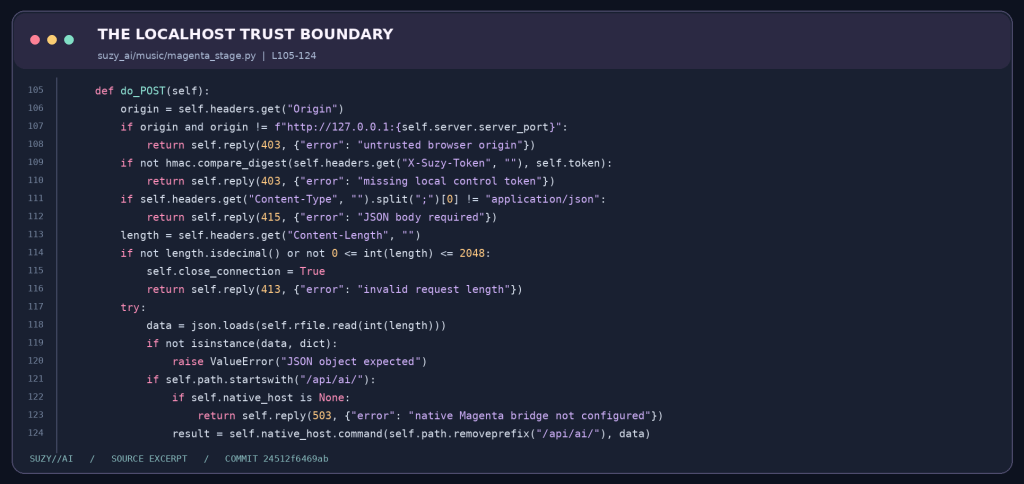
The local server checks browser origin, uses a per-session token with constant-time comparison, and bounds JSON request sizes. Python owns a process and command boundary; Swift owns the native audio graph. Local-first requires those boundaries to be concrete.
Source: magenta_stage.py, lines 105–124. The browser is a controller, not a public API.Code: magenta_stage.py, lines 105–124.
03 / When green lights meant silence
Now for my favourite genre of software problem: everything is green, nothing works.
We could detect and instantiate the Google AU. The 48kHz audio engine reported that it was running. The roughly 455MB local model file was present. The host had BPM information and MIDI commands. Status endpoints looked increasingly convinced they were doing music.
My headphones had a different opinion.
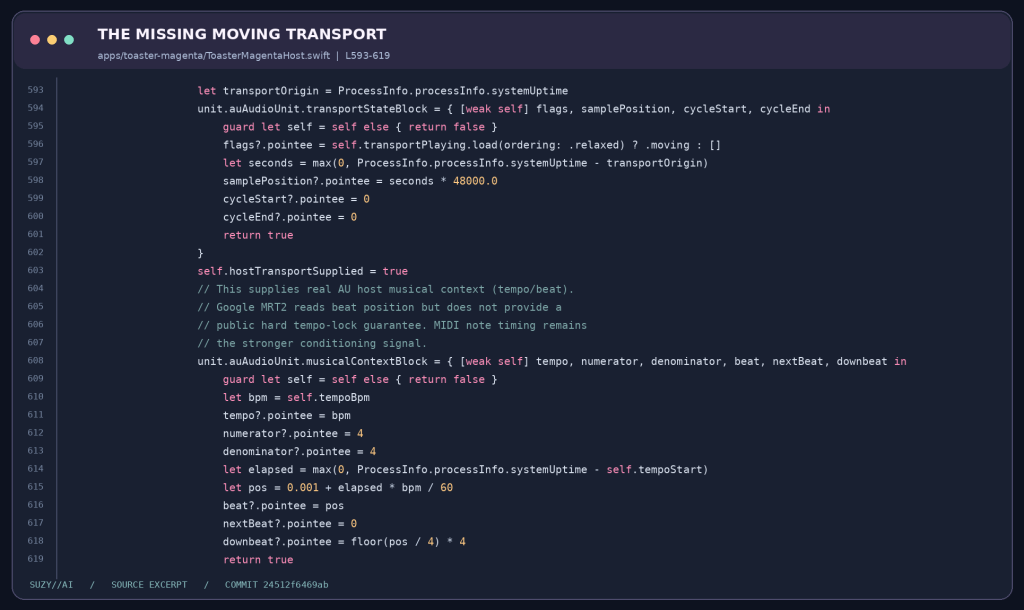
First, the host had to register the right plugin and identify its actual Audio Unit subtype. Then we discovered that providing tempo was not the same as telling the host transport it was moving. In Google’s AU implementation, a stopped transport can mean a render block full of zeros. PR #83 added a real transportStateBlock, with moving flags and a monotonically advancing sample position.
Source: ToasterMagentaHost.swift, lines 593–619. Tempo information is not a moving transport.Code: ToasterMagentaHost.swift, lines 593–619.
Then came NSCocoaErrorDomain Code=259, a lovely little clue from the AU process: a security-scoped model-file bookmark made by one application identity wasn’t necessarily readable by Google’s separate Audio Unit process. Host-side file existence was never proof of plugin-side model access. After experimenting with bookmarks, we exposed Google’s own model-selection interface, fixed a missing CoreAudioKit import, and eventually got actual generated audio.
Actual audio. Not just a status response saying native_au: true.
Even now, the host intentionally doesn’t pretend it can read a definitive model-loaded flag from an API Google doesn’t expose. It reports measurable PCM activity separately. Output signal at a mixer tap still isn’t proof that the correct headphones are selected. These seem like tiny distinctions until you’ve spent an evening chasing silence through three processes.
04 / Prompt-space orchestration, not fake stems
I wanted my own strange little arrangement, not a text box that says “make Radiohead but AI.”
The evolving set grew a family of prompt-conditioned sounds: warm piano, expressive violin, low cello/harmonium, glassy celesta/harp textures, and nimble jazz drums. The harmonic centre was my simplified Pyramid Song orbit: F♯ → Gmaj7 → A6 → F♯. I could play harmony with Z / X / C, and the old Weird Fishes bank remained on B / N / M / , as an alternate scene.
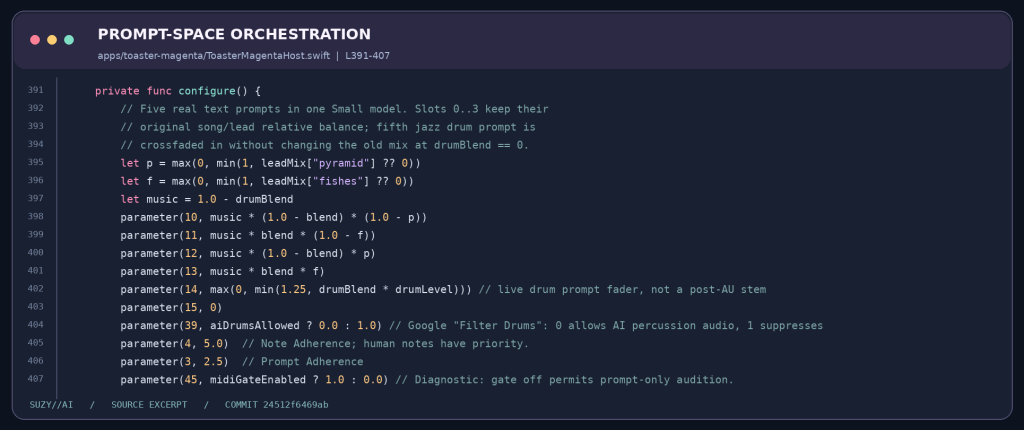
Underneath, the Swift host writes prompt weights into the same Google AU’s parameter tree. These aren’t five separately running models or five isolated generated stems. It’s one generative stereo output being steered through different musical directions. That’s why recorded layers matter: you select a sound, print a phrase as audio, and then move to the next voice.
Source: ToasterMagentaHost.swift, lines 391–407. Five prompt roles, one stereo generative model.Code: ToasterMagentaHost.swift, lines 391–407.
The code exposes note adherence, prompt adherence, MIDI gating, drum filtering, and gain. The prompts describe musical behaviour rather than asking the system to impersonate another musician. Notes still come from my choices. A model can surprise me within the arrangement, but it doesn’t get to author the arrangement for me.
This is what I mean by human-led AI. Not a moral slogan. A control surface.
One model, not five generators
The Magenta Audio Unit exposes a bank of weighted prompts, but still produces one shared stereo output. This is a constraint, not an implementation detail. If I wanted five independently fadeable instruments, I couldn’t simply turn five imaginary stem faders. I needed to commit a sound to audio, then change the prompt and create the next layer.
I kept the earlier Qwen text-model work available for musical planning experiments, but not as a synchronous dependency of the native render callback. That was an architectural choice: text inference can be useful without occupying the latency-sensitive signal path.
05 / Print the sound, not the instructions
One of the biggest late-night corrections was philosophical and technical at once.
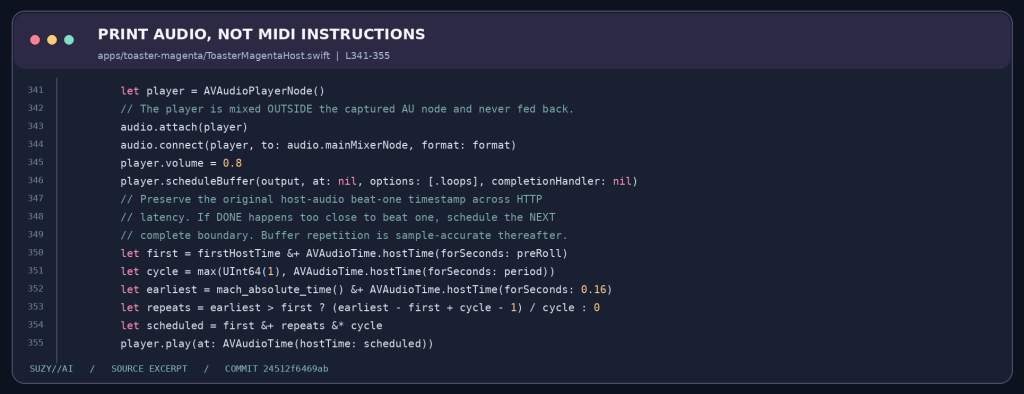
Originally, a loop could replay MIDI instructions into the model. But a generative model isn’t guaranteed to make the same sound twice. The exact violin phrase I liked could mutate when it came around again. Beautiful if I wanted evolution. Terrible if I wanted a dependable loop station.
I wanted BOSS-style sound-on-sound layering: record, press DONE, hear the sound repeat, add another actual audio layer, and fade the older one out. The distinction is simple: MIDI stores what to play. PCM stores what actually came out.
We added a real native capture path: the Swift host taps the AU’s reverb output, copies PCM buffers away from the real-time callback, and records a bounded WAV. It deliberately taps before the saved-loop mix, so existing loops don’t get endlessly rerecorded into themselves. A later version also uses AVAudioPlayerNode and in-memory buffers to repeat native audio without waiting for the WAV to travel back through Python and Chrome.
Source: ToasterMagentaHost.swift, lines 341–355. PCM preserves sound, not instructions to regenerate it.Code: ToasterMagentaHost.swift, lines 341–355.
The loop is scheduled against a native audio host timestamp and a measured period, not merely when a browser network request happens to finish. scheduleBuffer(..., options: [.loops]) handles the repeated samples within that engine. The older WAV/browser path remains a fallback and is not zero-latency.
And no, this doesn’t mean every clock in the system is magically sample-locked. Native AU time, browser AudioContext time, and physical audio-device latency are separate concerns. The code tries to preserve phase and align downbeats, but end-to-end timing still needs hardware measurement. Claiming otherwise would be a fantastic way to discover the laws of physics during a soundcheck.
Three clocks and a real downbeat
The native engine’s host time, the browser’s AudioContext time, and the physical Scarlett I/O timeline are not the same clock. A mouse click also traverses a network request and a process boundary before the native host sees it. A button responding instantly does not necessarily mean the phrase begins on beat one.
The native code preserves its first capture’s host-time origin, computes a loop period, and schedules a buffer at the next appropriate boundary. That permits precise repeating samples within that engine. It does not magically phase-lock independent hardware, browser output, and AU rendering. A trustworthy next version needs measured end-to-end latency and loopback tests, not impressive figures borrowed from a model announcement.
Eight gigabytes is a design constraint
Two minutes of stereo 48kHz Float32 PCM occupies approximately 46MB before overhead. Multiply that by several captured layers and add an always-running neural audio model, Chrome, and macOS, and the memory budget becomes part of the arrangement. A bounded recording duration, one model instance, careful buffer ownership, and explicit release matter more than another dramatic UI animation.
06 / The real-time system includes a human
At one point, the clock worked perfectly as long as I didn’t scroll down to the instruments. A delightfully realistic constraint for a performance interface.
So the beat clock became a floating, always-visible cue. 3, 2, 1, GO!, then record. It uses the browser audio clock with an output-latency adjustment rather than trusting the visual animation to define musical time. We added visible recording states, per-instrument faders, clip mutes, removal, and a way to stop runaway vocal effects. A rehearsal interface needs to behave more like a pedalboard than an aircraft maintenance console.
My voice followed a deliberately separate path: microphone → BOSS VE-22 → Focusrite Scarlett Solo → browser voice monitor and vocal AudioWorklet. The app tried to select Scarlett explicitly rather than silently falling back to the MacBook microphone. Keeping dry vocal audio separate from feedback effects was another surprisingly important form of self-preservation.
And the native Magenta engine could follow the Mac’s default output while Chrome was listening somewhere else. For a while, the AI developed a strong preference for the external speakers. I preferred the headphones. We eventually negotiated.
PR #135 tackled sample-based loop origins. PR #138 made the count-in visible. PR #139 added the native memory-loop path. PR #145, merged on performance day, fixed an especially theatrical bug where my chord keys still belonged to the piano when I tried to record cello or violin.
It turns out which instrument owns the keyboard right now is not an implementation detail when a human is standing onstage.
Five levels of evidence
My diagnostics eventually distinguished discovered (AU registration), initialized (engine and model-loading request), rendering (nonzero PCM), routed (correct physical playback device), and performable (the loop actually lands where my hands expect). Python and Node tests can establish the first layers of behavior, but they cannot replace listening through the real hardware.
That distinction is why I also documented an experimental vocal follower accurately. Its AudioWorklet estimates pitch and emits MIDI steering notes. It is not proof that Magenta was listening to, understanding, and answering my live singing as an audio-to-audio neural conversation.
07 / The performance wasn’t the benchmark
For a while the interface held two song decks, various arpeggios, and a very ambitious idea of how many things one person could control while singing. By the end I pulled the centre of gravity back to one Pyramid Song master loop, with voice, piano, strings, glass textures, and rhythm orbiting it. Less feature demonstration, more music.
The October 29 performance was an experimental demonstration of a musician-controlled system, not a production DAW or a standardized latency benchmark. I was playing and singing with a locally hosted AI instrument in the arrangement. I wasn’t presenting a fully autonomous bandmate, a fine-tuned model of my musical identity, or a proven sample-accurate synchronization system across native and browser audio. The experimental voice-to-MIDI follower existed in the code, but shouldn’t be mistaken for Magenta continuously listening to and interpreting everything I sang.
The GitHub history is pretty honest about the scramble. There are tests for transport, routes, capture, keyboard state, timing, and regressions. There are also reverts, unresolved experimental paths, and explicit notes that software CI can’t verify what an actual microphone, headphones, and Mac are doing. PR #95 literally reverted an interface change that broke audible output. I respect that commit. Sometimes the feature is knowing when to retreat.
08 / The interface between intention and surprise
The technical lesson wasn’t “AI can generate music.” We already knew that. It was learning how to make a stochastic sound engine observable, reversible, playable, and safe to mute. It was learning how much engineering is required for generative sound to become performable: observable state, bounded resource use, separated audio paths, real capture, predictable loop ownership, an emergency stop, and controls that make sense while somebody is actually playing.
The artistic lesson was strangely similar. Studying composition and improvisation taught me to listen to what emerges without surrendering form. Software engineering taught me to debug the conditions that make emergence possible. Somehow those disciplines finally met inside an 8GB laptop.
Next on my list: more robust clock-domain synchronization, durable session saving, cleaner native audio routing, better model-readiness signals, and eventually an artist-controlled collection of my own musical examples. Less pretending the machine understands me. More building the musical language through which we can understand each other.
The toaster wasn’t the instrument. The interface between intention and surprise was.
And if anyone wants to inspect the tiny haunted orchestra, break something responsibly, or help make it better: SUZY//AI is open source on GitHub.
No fixed studio. No fixed address. A surprisingly persistent downbeat. 🐟🍞